
NodeXL Pro INSIGHTS: Power BI meets NodeXL Pro
NodeXL Pro INSIGHTS is a Microsoft Power BI report template that allows the creation of interactive network reports from NodeXL Pro X (formerly Twitter) datasets.
A NodeXL Pro INSIGHTS report makes use of many different data visualizations – from simple tables to hashtag clouds, from image grids to scatter plots. Easily pivot around all social media dimensions: Tweets, users, groups, hashtags, media, sentiment, space and time.
Click here to view a full sample report online (optimized for web browsers Chrome and Edge).
A new way to view X (formerly Twitter) data
NodeXL Pro INSIGHTS is a new way to view and analyze NodeXL X (formerly Twitter) network data building on the Microsoft Power BI platform.
See how finding insights in collections of Twitter data is easier than ever with web based interactive data visualizations. Watch the video.
Designed to enable discovery and communication, with just a few clicks NodeXL Pro INSIGHTS can reveal the key people, groups, places and topics related to a collection of tweets.
NodeXL Pro INSIGHTS Report Pages
Below you see a selection of the most important report pages of a NodeXL Pro INSIGHTS report on the Twitter hashtag #PowerBI.
Click here to view the full report online (optimized for web browsers Chrome and Edge).
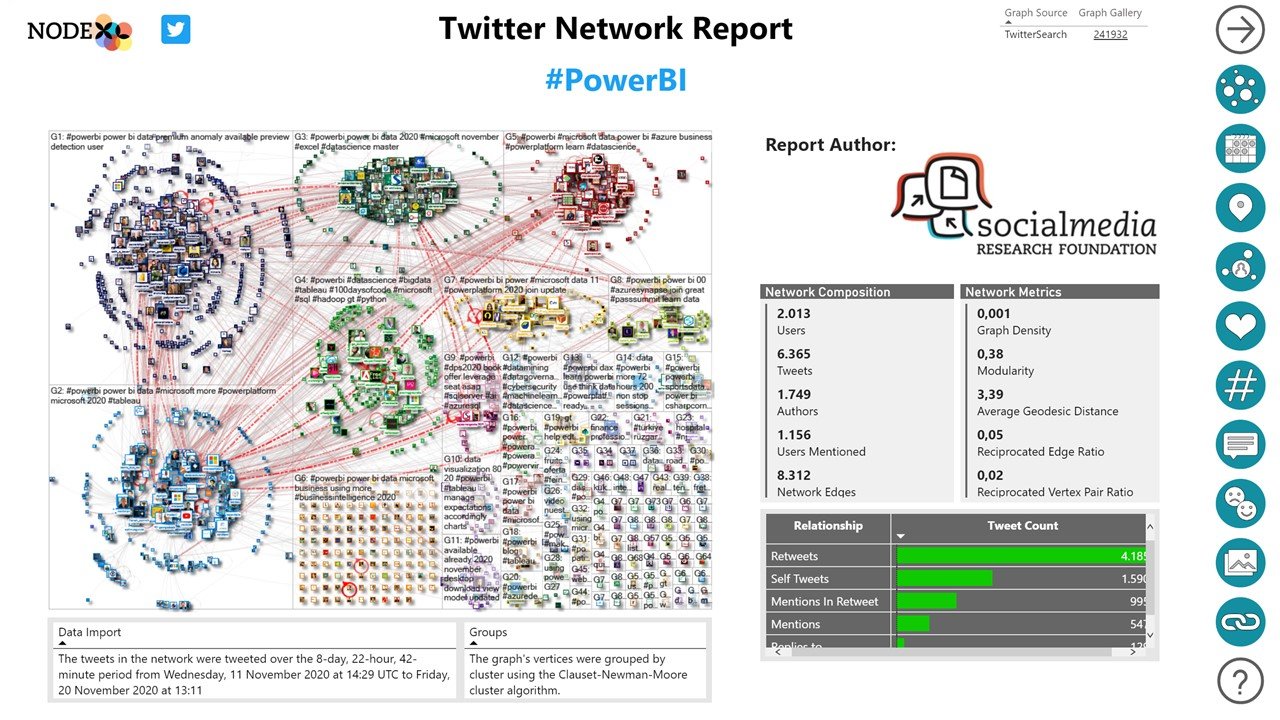
Start Page
The first page of the NodeXL Pro INSIGHTS Report is an overview of the data, showing the network map, the time it was created, the time period it covers.
On the far right side of the page is column of icons that link to many of the other report pages for Network Overview, Time Series analysis, Location analysis, Influencers, Top Tweets, Hashtags, Words, Sentiment, Images, and URLs. Click any of these icons to jump straight to that part of the report.
Overview
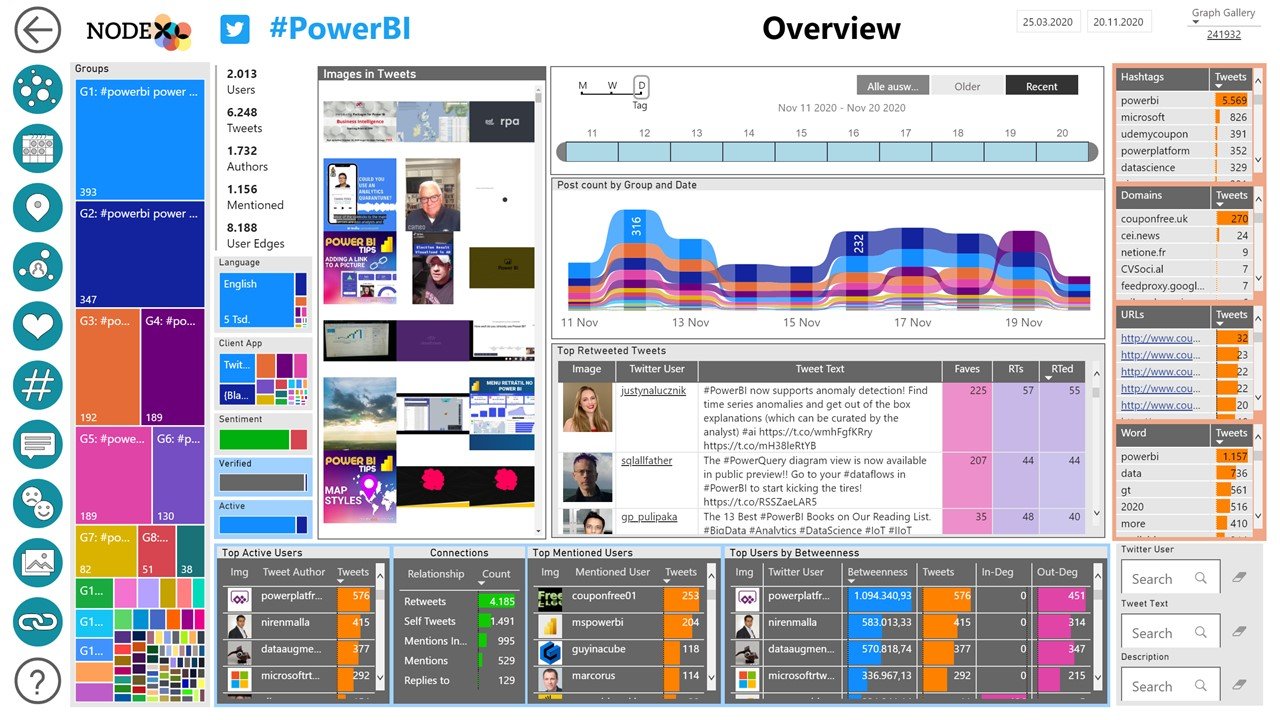
The NodeXL Pro INSIGHTS Overview page is a compact summary of the data set, highlighting the total population and the relative sizes of the sub-groups, the rate of activity over time, the top Hashtags, and top authors.
Users can enter search terms or click on any display element to filter the remaining data.
By left-clicking on a user’s profile image, you will be directed to the profile on Twitter. By right-clicking on a user you can drillthrough to the available data about a user within the report.
Network
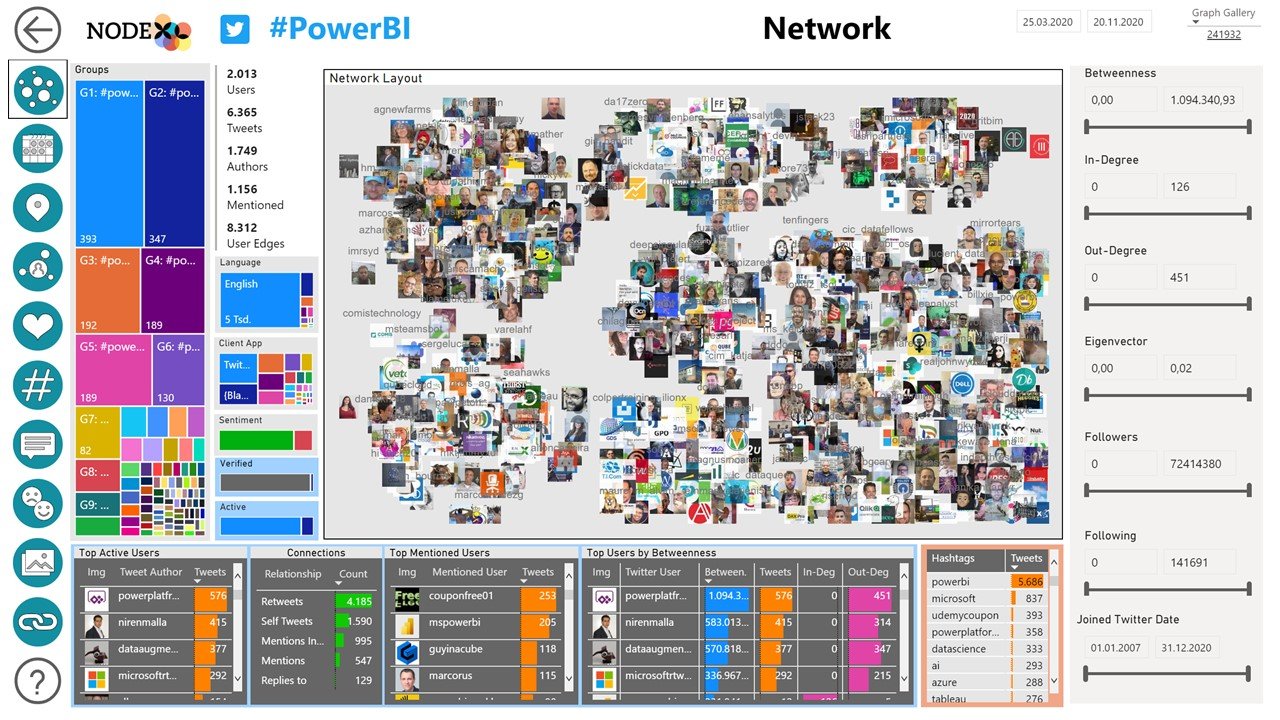
The Network report page displays the shape of the crowd by ploting each author in a scatter plot chart located close to the other users with whom they are most connected.
Use the Betweenness slider to filter users by their influence, just a small adjustment here can quickly reveal the thought leaders in a group.
Time
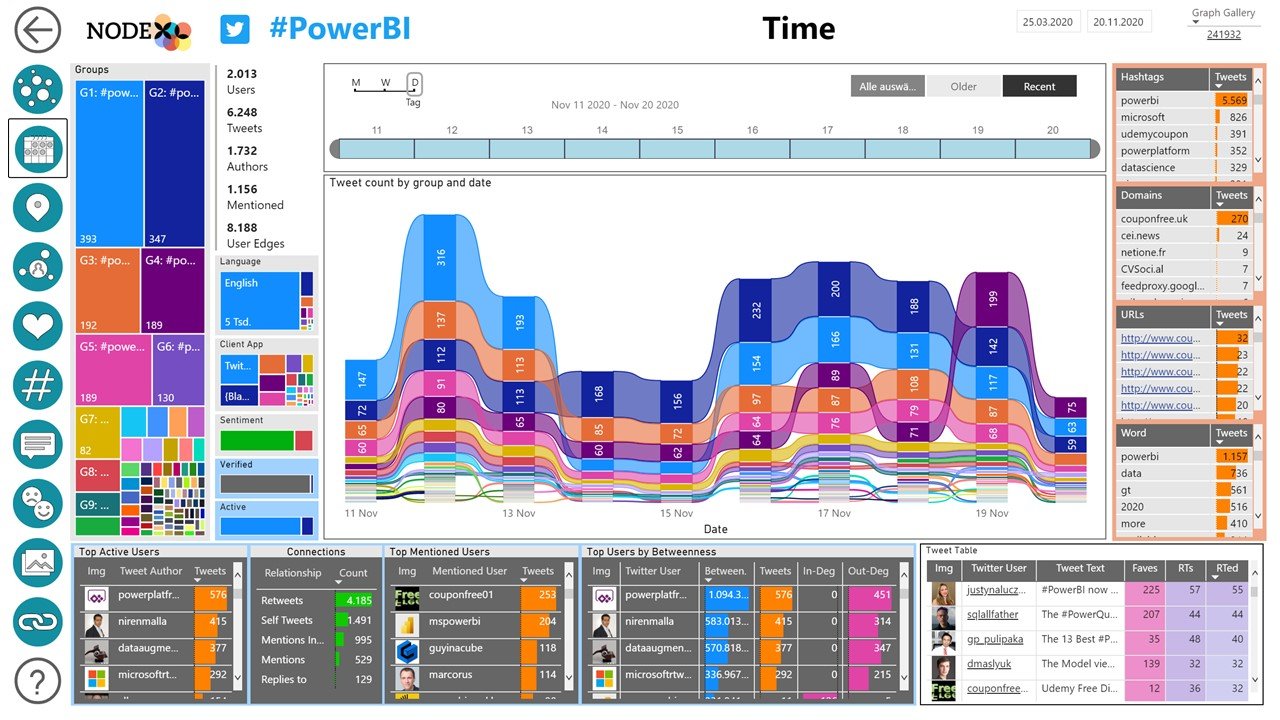
The Time report page displays the activity in the data set over the duration of the data, revealing the days of highest activity along with the general pattern of activity over time. These patterns can reveal important insights into when a conversation reaches its peak of activity.
Time Grid
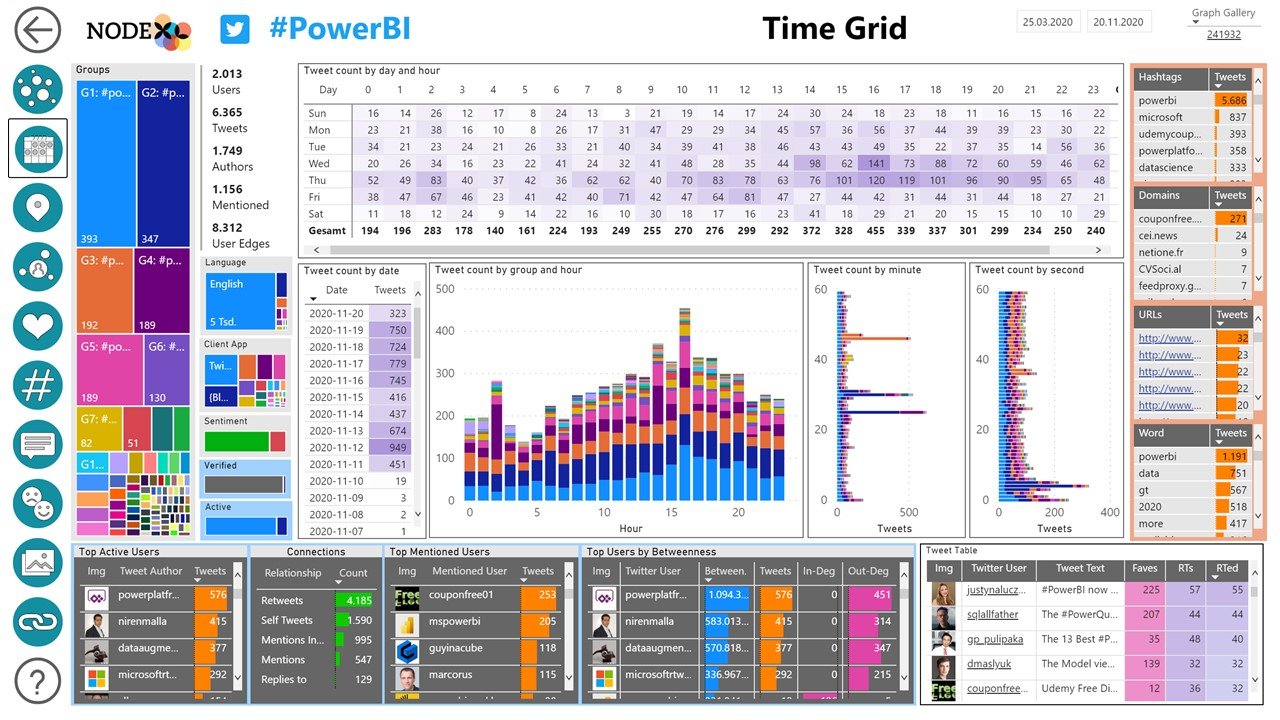
The Time Grid report page displays time in a different way – highlighting the days of the week and the hours of the day that are most active. Zero in on the most active hour of a week and display the content and authors that lead that activity.
Location
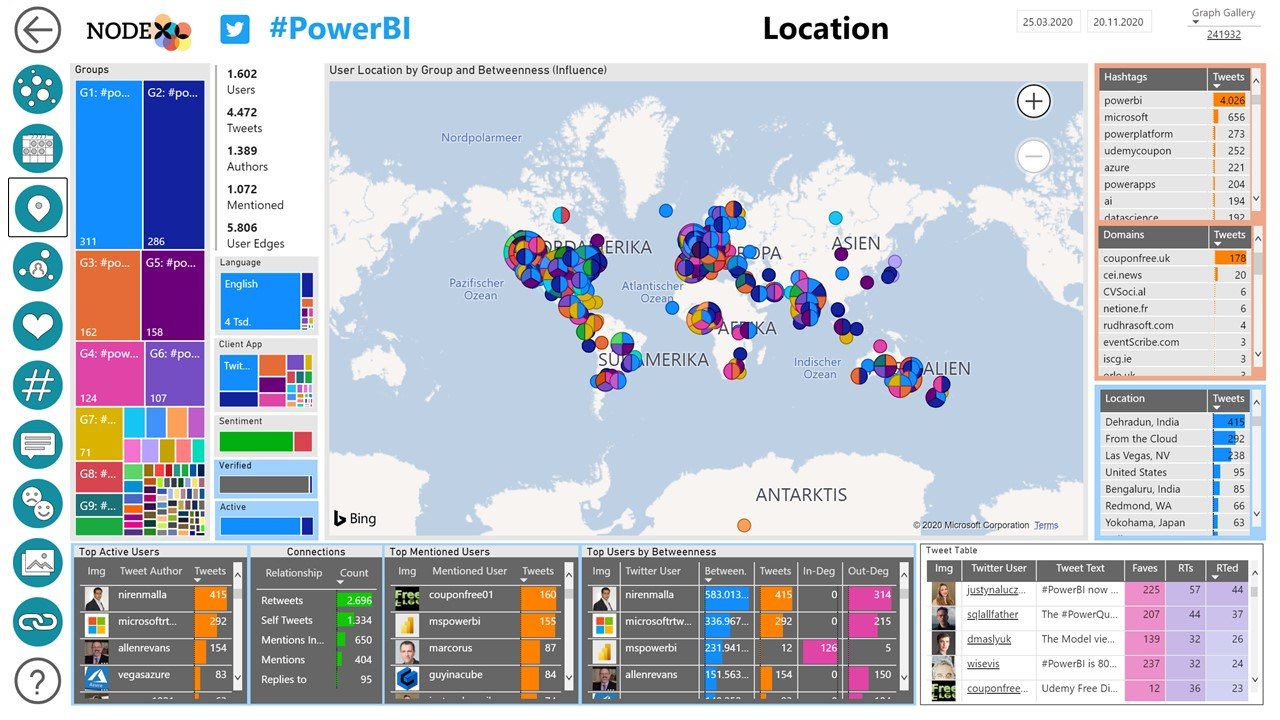
The Location report page contains a world map to display Twitter users by location. The location is based on a user’s self-description as seen on the profile.
Influencers
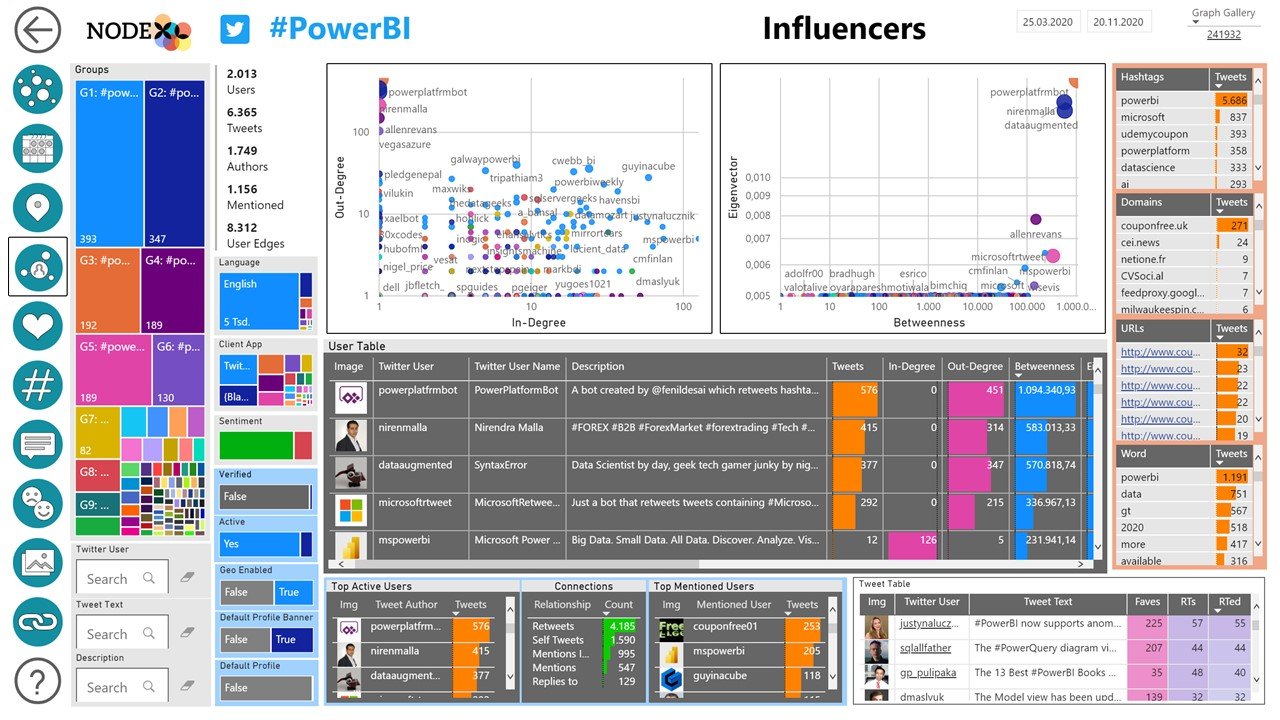
The participants in a discussion in Twitter are not all the same. Users vary significantly in terms of the number of people they connect to and the number of people who connect to them. Network metrics that capture the “centrality” of a user are also helpful ways to identify the most influential contributors.
Top Tweets
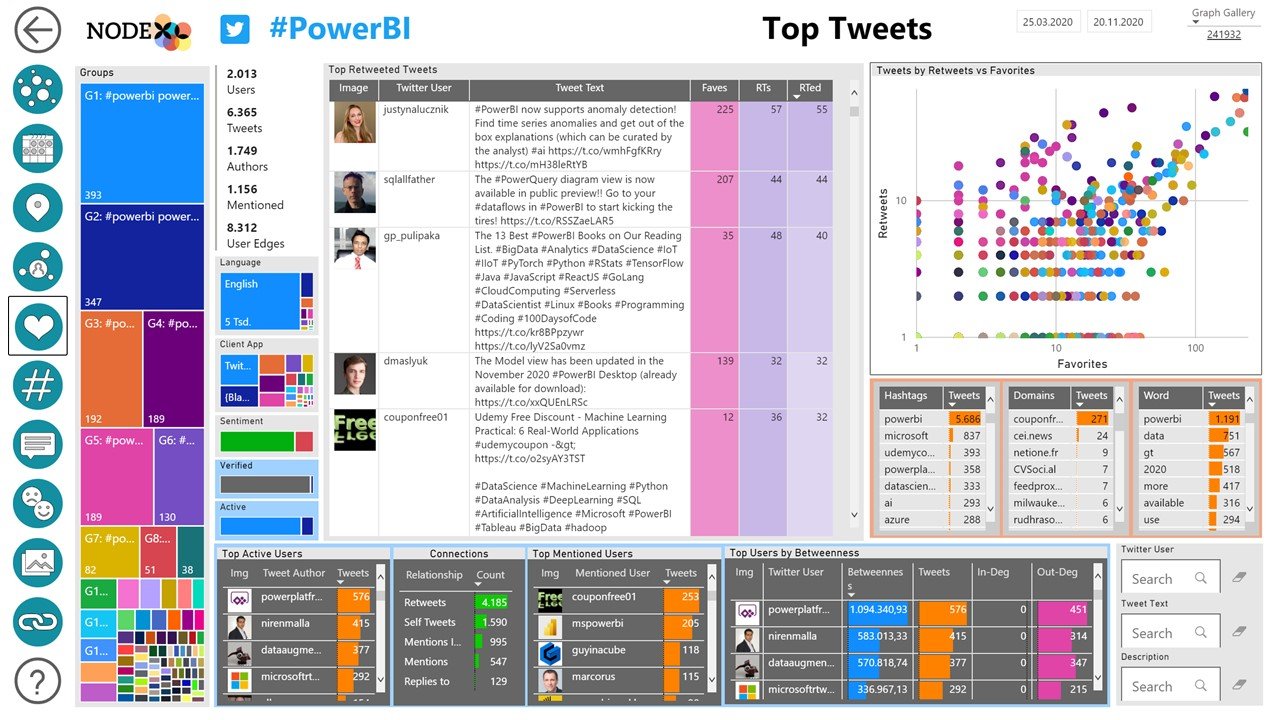
Content in a Twitter stream can be ranked to highlight the most important and influential Tweets. This is reported on the NodeXL Pro Insights Top Tweets report page.
Each tweet can be ranked in terms of the number of retweets it received and plotted against the number of likes (or “Favorites”) it received.
At the upper right corner of this scatter plot are a special group of messages, the tweets that rank highly on both dimensions.
These influential authors and their content have more visibility and impact than almost all the other messages in the data set.
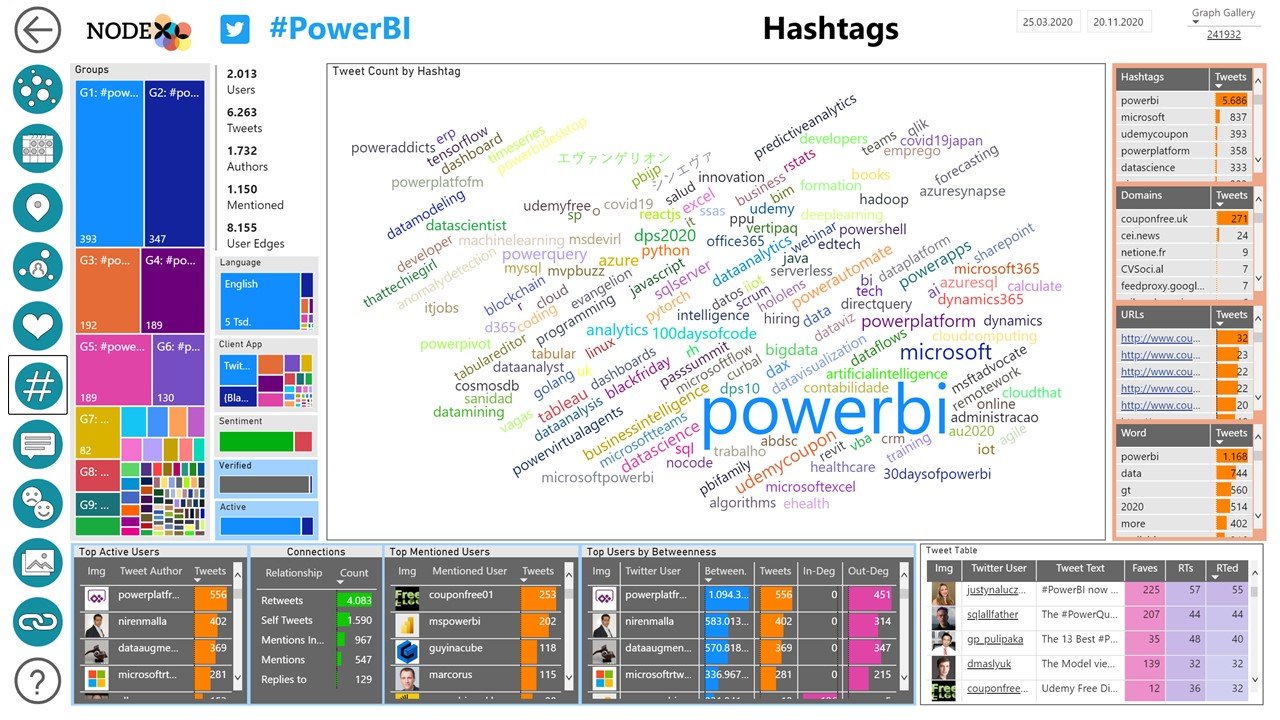
Hashtags
Hashtags are specially marked types of content in Tweets, the use of the leading number sign indicates that a word is a “hashtag” which describes the topic of a tweet.
The hashtag report page displays the most frequently used hashtags in the tweets in this dataset sized by their frequency of use.
Select any hashtag to see the users who used it most frequently and the associated URLs and other words and hashtags.
Words
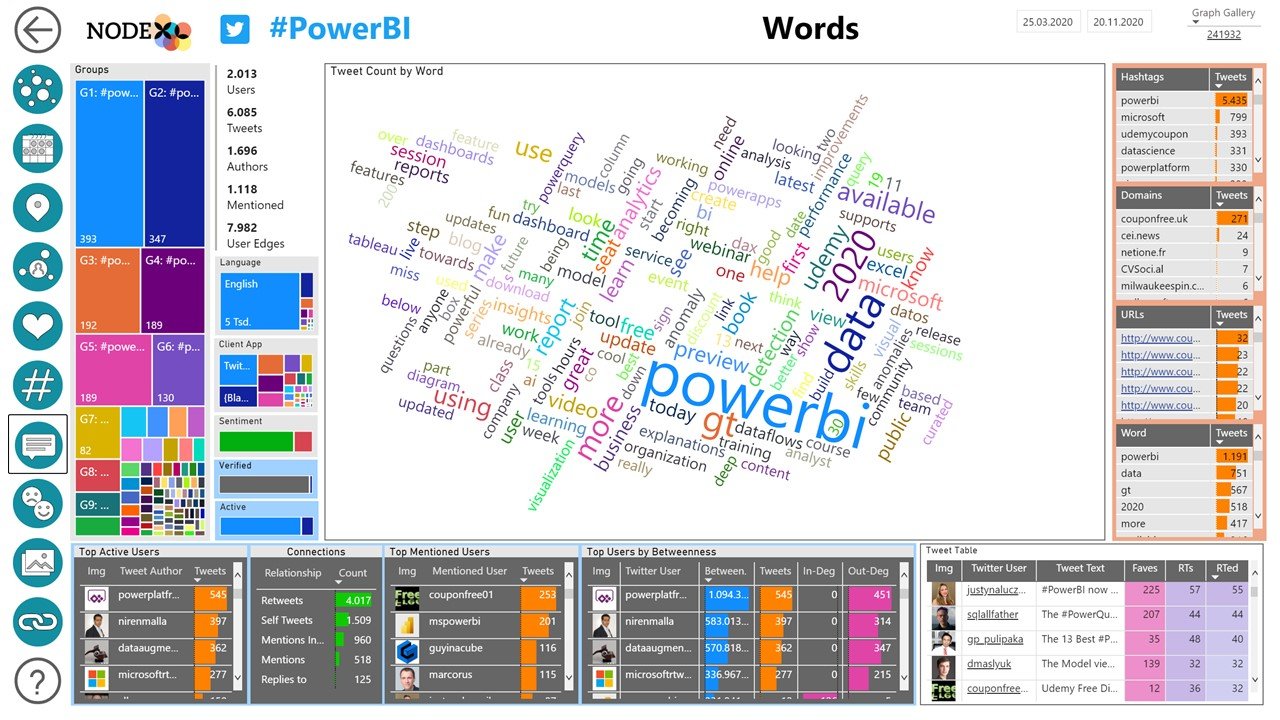
Words are most common contents of a Tweet. In the Words report page we display a word cloud with words sized by their frequency of use.
Select any of the related filters to narrow down the words based on other attributes, like the type of device used to access Twitter.
Select any of the related filters to narrow down the words based on other attributes, like the hashtags that co-occur with these words.
Sentiment
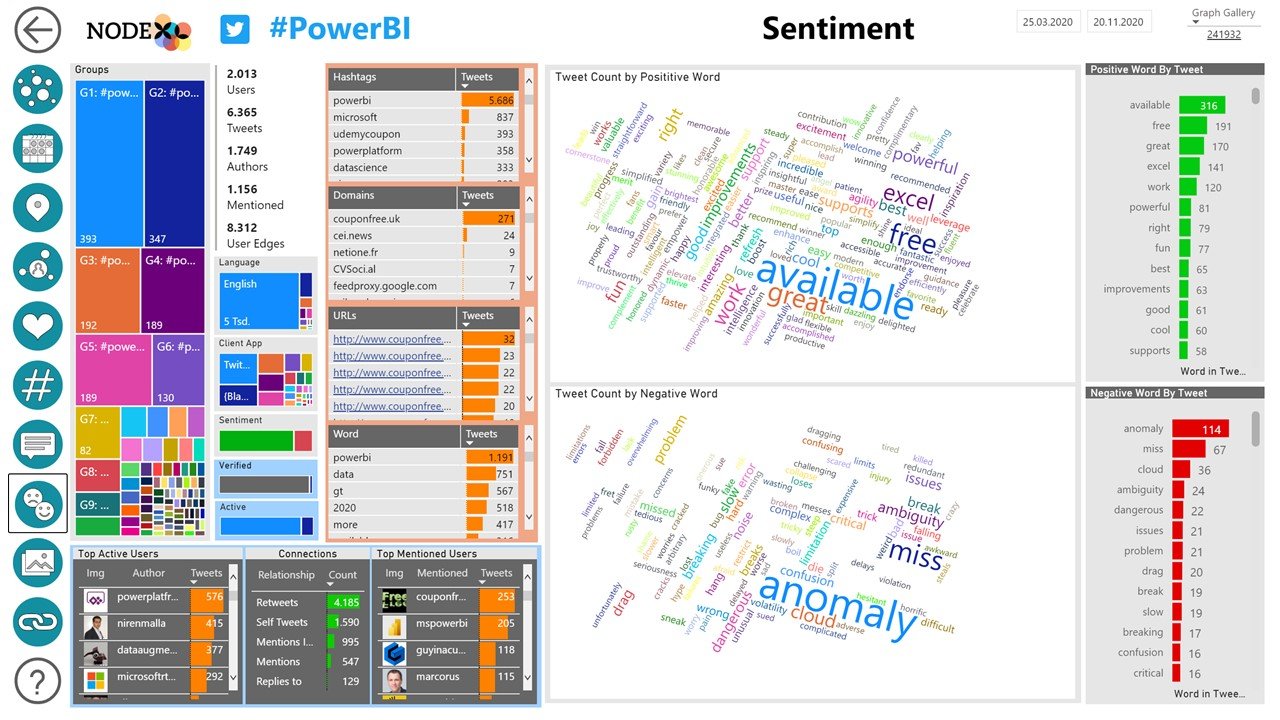
Words can be classified as positive or negative. NodeXL Pro Insights uses a sentiment list to help identify positive and negative words along with the people who use them.
Select any of the related filters to narrow down the users and reveal their language use.
Media
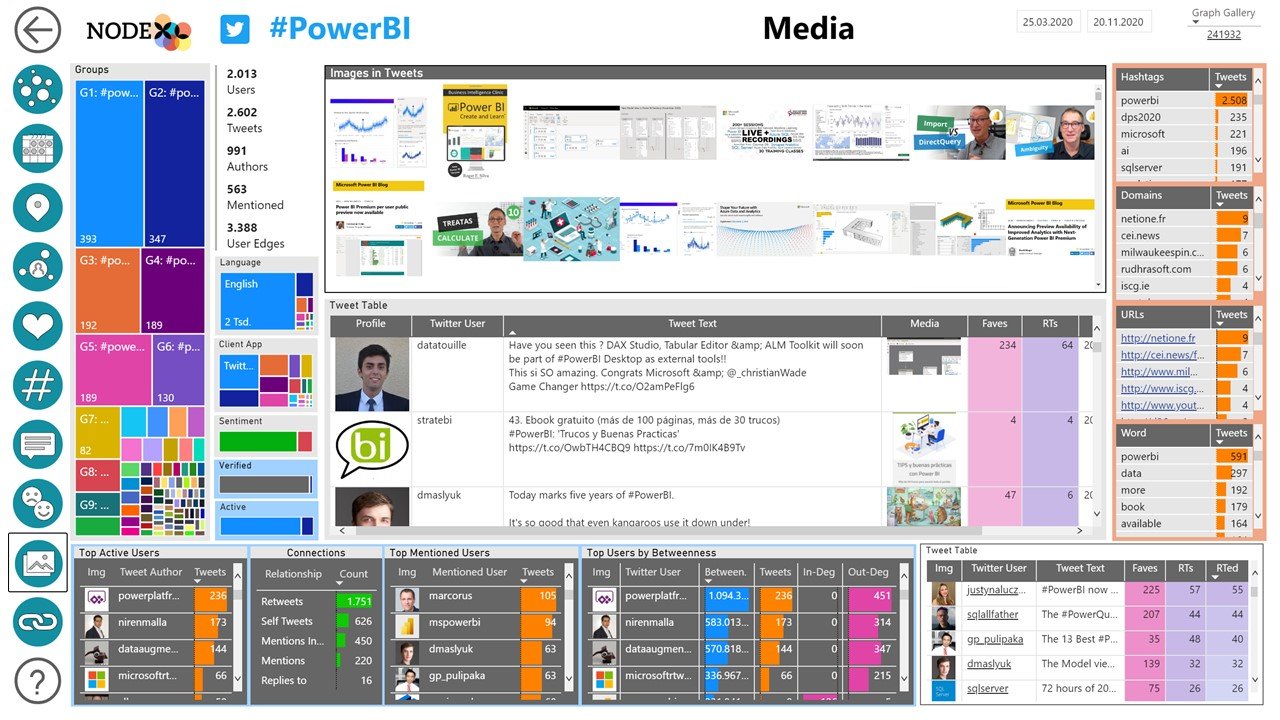
An overview of the images and videos that are shared via tweets can be seen in the Media page of NodeXL Pro Insights report. Select one or more images to reveal the details of the people who tweeted them.
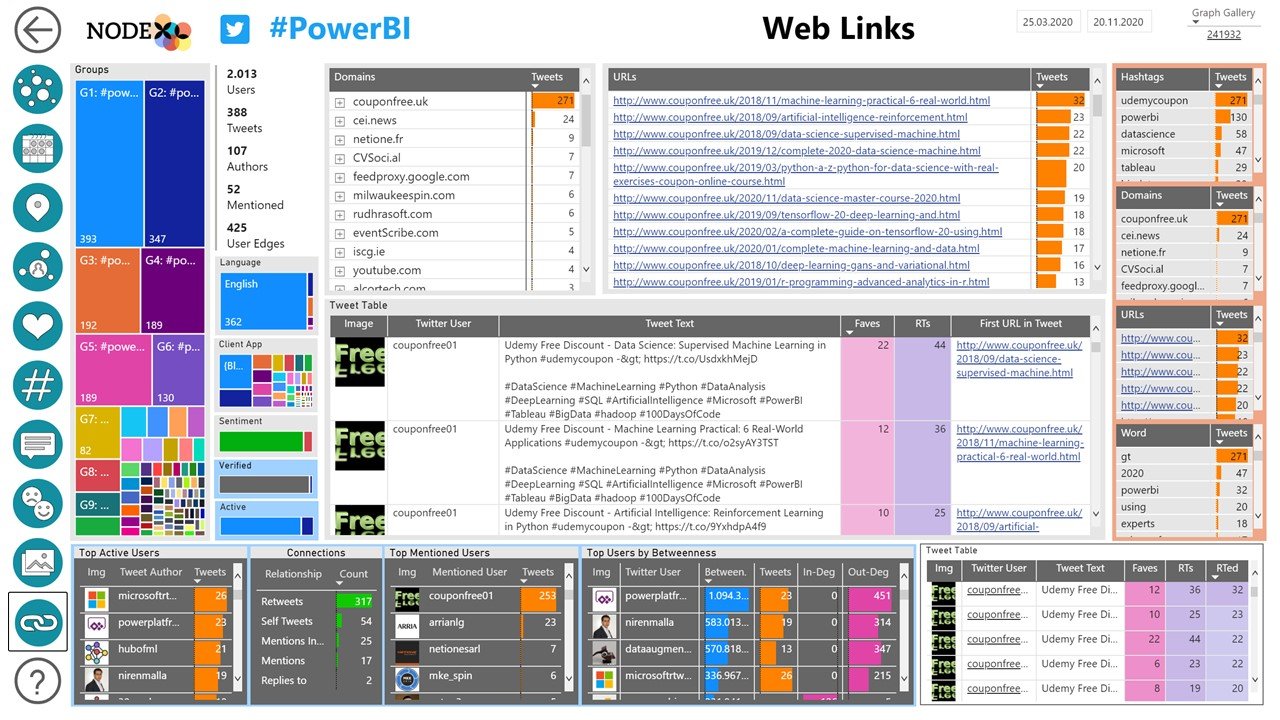
Web Links
URLs are an important part of many tweets. The Web Links report page displays the list of URLs and their Domains to highlight the web sites that are most often mentioned in a data set.
Understanding the sources of information in a discussion is important for many communication engagement plans.
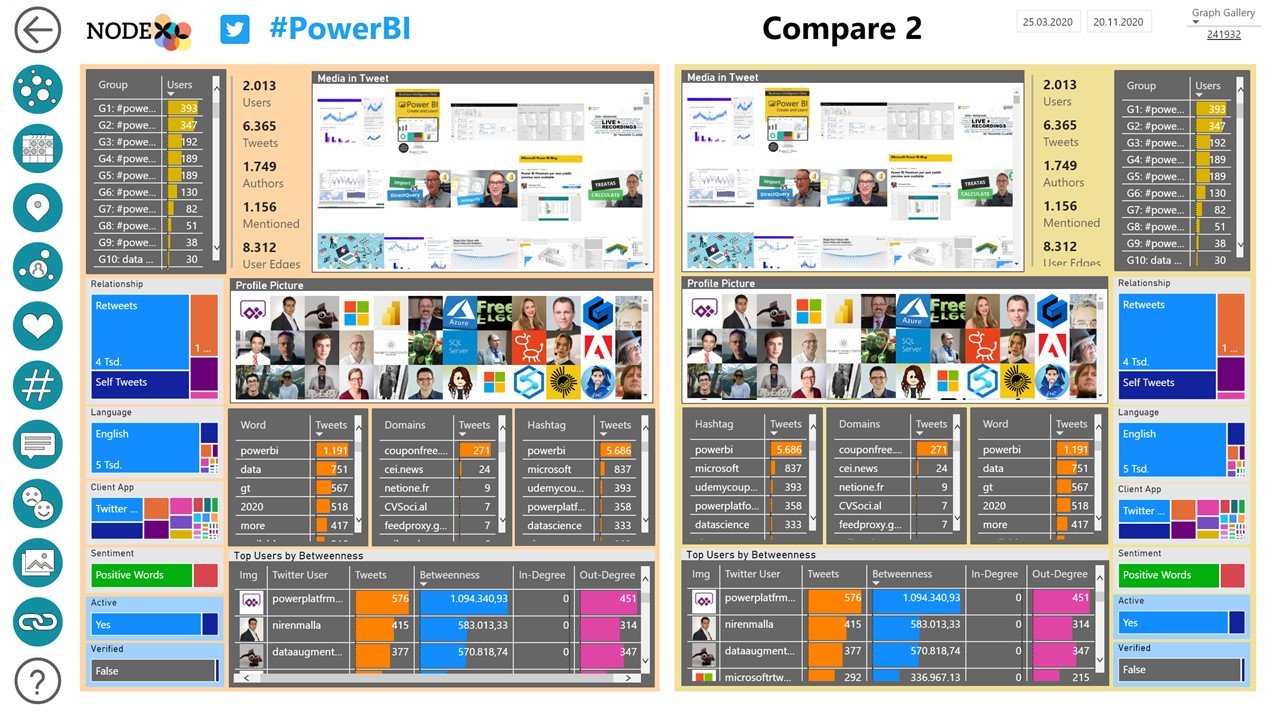
Compare 2
Quickly contrast two sets of users via the NodeXL Pro Insights “Compare 2” report page. Select two sets of attributes to quickly compare the resulting sub-populations and market segments.
See the side-by-side results with just a few clicks to reveal the ways sub populations differ or are similar to one another.
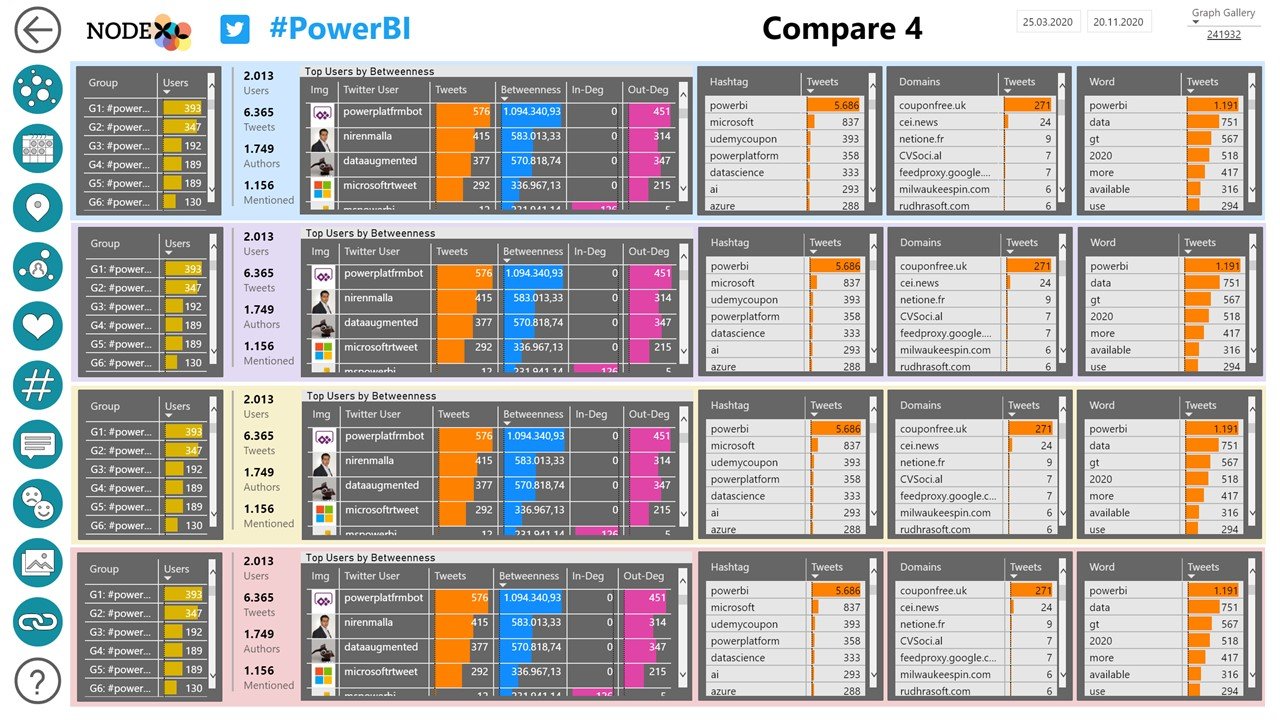
Compare 4
For a broader overview, the “Compare 4” report page allows users to select up to 4 different sets of attributes to quickly display a table that contrasts these distinct populations.
What are the benefits?
★
Network Insights
The core of any NodeXL Pro Insights report is a network analysis that contains a variety of network metrics on the overall, group and user level.
★
Understand Communities
A cluster algorithm segments users into groups which can be explored on the content level – this is the key to understanding communities.
★
Reveal Influencers
Reveal important influencers based on network centrality scores like Betweenness Centrality, Eigenvector Centrality and others.
★
User Analysis
Analyze the most active users and investigate spammers and (potential) bots with the Drillthrough function.
★
Discover Shared Contents
Sort tables with the most frequently used hashtags, words, URLs and domains – or look at word clouds and image grids to discover shared contents in tweets.
★
Shareable
Easily publish the reports to the web and/or embed it on your website.
★
Time Series Analysis
See the rhythms and spikes in the activity of users, groups and the whole network over time – by day, by the hour, the minute and the second.
★
Interactive data
Click on any item on any report page to filter the data. Use the Control-key to select multiple data dimensions.
Social Media Data Dimensions
See below for available data dimensions that can be analyzed and visualized in NodeXL Pro Insights reports.
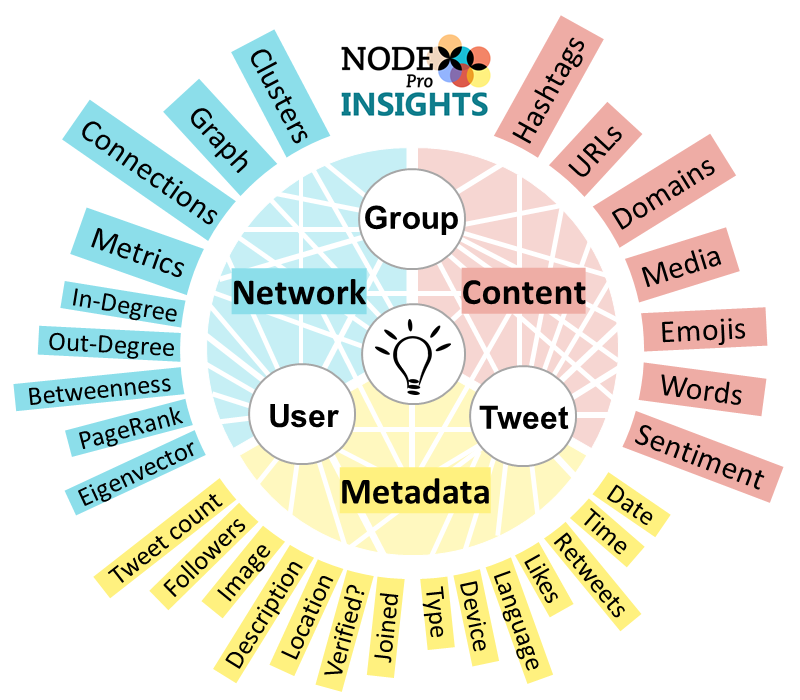
Network
- Overall Metrics
- Cluster Analysis
- Group Metrics
- User Centrality Metrics
Content
- Text
- Sentiment
- Hashtag
- URL/Domain
- Media/Image
User Metadata
- Followers/Following
- Location
- Description
- Joined Twitter Date
- Verified?
Tweet Metadata
- Faves / Retweets
- Tweet type
- Date
- Device
- Language
License Types & Pricing
NodeXL Pro Insights – Student
$39/month
One-month subscription of the NodeXL Pro Insights report template for student users
Allows the export of NodeXL Pro Twitter datasets to MS Power BI Service
Requires a NodeXL Pro User license and a Power BI Pro account
NodeXL Pro Insights – Nonprofit
$69/year
One-month subscription of the NodeXL Pro Insights report template for nonprofit / academic users
Allows the export of NodeXL Pro Twitter datasets to MS Power BI Service
Requires a NodeXL Pro User license and a Power BI Pro account
NodeXL Pro Insights – Commercial
$139/month
One-month subscription of the NodeXL Pro Insights report template for commercial users
Allows the export of NodeXL Pro Twitter datasets to MS Power BI Service
Requires a NodeXL Pro User license and a Power BI Pro account
Here is what our customers say:

“NodeXL Pro Insights reports offer a completely new way to look at Twitter data.”
Prof. Ben Shneiderman

“This is AMAZING! There is no better way to understand Twitter data.”
Niall O’Gribin

“This is the future! Network science applied to social media data should be a standard for all social media experts.”
Dr. Wasim Ahmed
Frequently Asked Questions
See below for FAQs around NodeXL Pro Insights. Visit this page for FAQs around NodeXL.
General Questions
What is NodeXL Pro?
NodeXL Pro is the all-in-one solution for (social media) network data collection, analysis and visualization using the familiar Microsoft Excel spreadsheet application. NodeXL Pro generates network based content analysis insights into connected structures requiring no programming skills. Produces data about influencers, groups, and content over time.
What is Power BI?
Microsoft Power BI is a powerful data analysis and visualization platform in the cloud. Power BI enables the creation of rich linked dashboards that allow users to quickly slice and filter data.
What is NodeXL Pro INSIGHTS?
NodeXL Pro INSIGHTS is a Microsoft Power BI report template that turns NodeXL Pro Twitter network datasets into rich interactive reports with a huge variety of data visualisations.
Do I get access to the data model?
No.
Is NodeXL Pro INSIGHTS available for platforms other than Twitter?
No, not yet. The initial report template for NodeXL Pro INSIGHTS is for Twitter. In the coming year additional templates for data sources like YouTube and Wikipedia will be released.
What are the differences in the subscriptions – student, nonprofit, commercial?
All NodeXL Pro Insights subscriptions are for the same application, only the type of user (Student, Academic/Govt/Non-Profit, and Commercial) is different. The pricing structure reflects the ability of our users to pay for a license. Please select the license appropriate to you.
Create a Report
What are the requirements to create my own NodeXL Pro INSIGHTS report?
In order to create your own NodeXL Pro INSIGHTS report you need
- a NodeXL Pro INSIGHTS subscription
- a NodeXL Pro User license
- a NodeXL Pro Twitter network data set that has been successfully processed by the NodeXL Pro INSIGHTS “recipe” (settings options file).
A tutorial on how to create a NodeXL Pro INSIGHTS report is available here.
System and software requirements for NodeXL Pro can be found here.
How is a NodeXL Pro INSIGHTS report created?
NodeXL Pro Users can import network datasets from Twitter with several importers: The Twitter Search Network Importer, the Twitter Users Network importer, and the Tweet ID network importer.
When these datasets are analyzed with any of the official “NodeXL Pro Twitter Data Recipes”, they can be exported to the Power BI Pro Service via Data > Export > To Power BI Service.
During the export, the NodeXL Pro Insights report template is applied to the dataset, and after a short while the full report will appear in your MS Power BI tenant.
This process is explained in further detail in the tutorial “How to create a NodeXL Pro Insights report”.
Do I need NodeXL Pro to create a NodeXL Pro INSIGHTS report?
Yes. A NodeXL Pro Twitter Social Media Network data set created with NodeXL Pro is required to generate a NodeXL Pro INSIGHTS report.
Can I get a NodeXL Pro INSIGHTS report without a subscription or NodeXL Pro?
Connected Action offers a service providing NodeXL Pro INSIGHTS reports for Twitter topics for a per report fee with no subscription.
Data Storage
How many reports can I create per month?
As many as you can fit in a 10GB data storage quota.
How many reports can I have in my workspace at a time?
As many as you can fit in a 10GB data storage quota.
For how long can I keep the data in my workspace?
Reports are retained for the duration of your NodeXL Pro INSIGHTS subscription and for 90 days after the last subscription payment.
How can I remove a report from my workspace?
Log into your Microsoft Power BI workspace and simply select and delete any unwanted NodeXL Pro INSIGHTS reports.
Can I recover reports once they have been deleted after my subscription ends?
No, but you can re-create the same report at any time when starting a new subscription and exporting the original dataset from NodeXL Pro again.
Share a report
How can I share NodeXL Pro Insights reports?
You can choose to publish a NodeXL Pro INSIGHTS report to the web when selecting this option in the “Export to NodeXL Pro INSIGHTS” window in NodeXL Pro under Data > Export.
In this case you will receive an email with a link to a publicly accessible URL that starts like this https://app.powerbi.com/….
The email also contains a html embed code so you can publish the report on your own website.
How can I delete a NodeXL Pro INSIGHTS report once it has been shared publicly to the web?
You can delete and control reports in your NodeXL Pro INSIGHTS dashboard at https://nodexlgraphgallery.org/Pages/Insights.aspx.

What is NodeXL Pro?
NodeXL Pro is the all-in-one solution for (social media) network data collection, analysis and visualization using the familiar Microsoft Excel spreadsheet application. NodeXL Pro generates network based content analysis insights into connected structures requiring no programming skills. Produces data about influencers, groups, and content over time.